Soundscapes for Web Games: A Pluggable Howler Implementation - Part 2
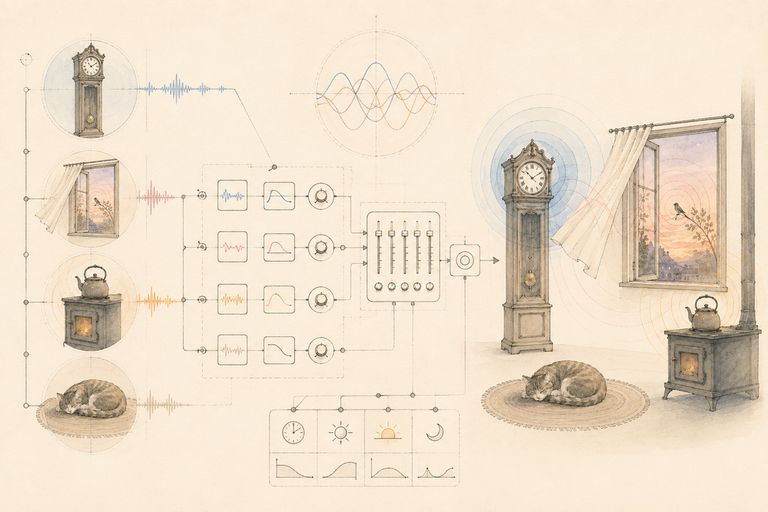
Part 2 of 2. Part 1 covers what a soundscape is and the three knobs that buy the most realism.
So, Part 1 made the case for the layer. This post is the code. If you’ve shipped (or you’re shipping) a web game with Phaser, three.js, r3f, or plain React on top of a canvas, and ambience still feels like a tape loop, this is aimed squarely at you.
Here’s the thing I want to flag up front. The first three versions of this engine I wrote were way too big. Class hierarchies, scene managers, a “mixer service” with opinions about your DI container. I kept thinking surely it has to be more than this, and it kept not being.
The whole thing is one class under a hundred lines (types included), with a six-function adapter underneath it. What varies between projects is the bus underneath the engine and the lifecycle binding above it. Both end up smaller than you would guess.
Why Howler
You could go straight to AudioContext and hand-roll everything. I’ve done it. I don’t recommend it.
For ambience work, Howler 🔗 is the right tradeoff: cross-browser autoplay handling, per-instance volume / pan / rate / fade, sprite support if you want it, around 7KB gzipped. It wraps Web Audio, so you keep the graph. You just stop writing the boilerplate.
Everything below assumes Howler. The Bus Adapter contract is the seam, though, so you can swap in raw Web Audio later and the engine does not change. The demos on this page do exactly that: they run the engine class below, unmodified, over a small Web Audio adapter. The pluggability claim is load-bearing.
Step 1: Define the sample shape
Before any code runs, you need a way to describe a soundscape. One bed, N emitters, each emitter with a sample pool and randomization ranges.
export type Range = [min: number, max: number];
export interface EmitterDef {
samples: string[];
intervalMs: Range;
volume: Range;
pan: Range;
rate: Range;
}
export interface SoundscapeDef {
bed: { sample: string; volume: number; fadeInMs?: number };
emitters: EmitterDef[];
maxConcurrentEmitterInstances?: number;
}(rate is what Part 1 called the pitch knob. Howler’s API calls it rate, so the def follows the API.)
A concrete one, for the café from Part 1:
export const CAFE: SoundscapeDef = {
bed: { sample: "restaurant-bed-light", volume: 0.9, fadeInMs: 800 },
emitters: [
{
samples: ["cups-clanging", "cash-register", "espresso-machine"],
intervalMs: [3000, 8000],
volume: [0.25, 0.45],
pan: [-0.5, 0.5],
rate: [0.95, 1.05],
},
{
samples: ["phone-ringing"],
intervalMs: [12000, 25000],
volume: [0.1, 0.18],
pan: [-0.4, 0.4],
rate: [0.98, 1.02],
},
],
maxConcurrentEmitterInstances: 3,
};The counter pool has three samples and a tight interval (compressed to a demo timescale; a real café breathes slower). The phone has one sample and rings rarely, quiet and off to one side. This is the whole tuning surface. You can iterate a scene’s feel without touching code, which is exactly the property you want when a sound designer is sitting next to you.
Don’t take my word for it; this def is live:
Live def
The CAFE def above, running
Valid def. Changes apply ~half a second after you stop typing.
cups-clangingfired ×0cash-registerfired ×0espresso-machinefired ×0phone-ringingfired ×0
Step 2: The bus adapter contract
The core engine never calls Howler directly. It calls into a Bus Adapter, which is what makes the engine pluggable.
export interface BusAdapter {
playBed(name: string, opts: { volume: number; fadeInMs?: number }): number | null;
playEmitter(
name: string,
opts: {
volume: number;
pan: number;
rate: number;
onEnd?: () => void;
},
): number | null;
stopBed(id: number, fadeOutMs?: number): void;
stopAll(): void;
duck(): void;
unduck(): void;
}Six functions. Anything that satisfies this shape can host the engine.
Six functions is suspiciously small for something called a mixer. I know. The first time I wrote this contract I deleted half of it twice before I trusted that it was enough. Want a single ambience bus with a global duck multiplier? Implement it that way. Want a full master/music/ambience/sfx mixer? Implement duck() as a category gain change. The engine does not care.
The seam is the whole game.
Step 3: A minimal single-bus Howler adapter
The simplest adapter: one ambience gain, a duck multiplier, and a map of preloaded Howls keyed by name.
import { Howl } from "howler";
const AMBIENCE_BASE_VOLUME = 1.0;
const DUCK_MULTIPLIER = 0.25;
const DUCK_FADE_MS = 300;
export function createSingleBusAdapter(samples: Record<string, string>): BusAdapter {
const howls = new Map<string, Howl>();
for (const [name, src] of Object.entries(samples)) {
howls.set(name, new Howl({ src: [src], preload: true }));
}
let ambienceMultiplier = 1.0;
const liveBeds = new Set<{ howl: Howl; id: number; baseVolume: number }>();
const liveEmitters = new Set<{ howl: Howl; id: number }>();
function effectiveVolume(base: number) {
return base * AMBIENCE_BASE_VOLUME * ambienceMultiplier;
}
return {
playBed(name, { volume, fadeInMs }) {
const howl = howls.get(name);
if (!howl) return null;
const id = howl.play();
howl.loop(true, id);
const target = effectiveVolume(volume);
if (fadeInMs) {
howl.volume(0, id);
howl.fade(0, target, fadeInMs, id);
} else {
howl.volume(target, id);
}
liveBeds.add({ howl, id, baseVolume: volume });
return id;
},
playEmitter(name, { volume, pan, rate, onEnd }) {
const howl = howls.get(name);
if (!howl) return null;
const id = howl.play();
howl.volume(effectiveVolume(volume), id);
howl.stereo(pan, id);
howl.rate(rate, id);
const entry = { howl, id };
liveEmitters.add(entry);
howl.once(
"end",
() => {
liveEmitters.delete(entry);
onEnd?.();
},
id,
);
return id;
},
stopBed(id, fadeOutMs = 500) {
for (const entry of liveBeds) {
if (entry.id !== id) continue;
entry.howl.once("fade", () => entry.howl.stop(id), id);
entry.howl.fade(entry.howl.volume(id) as number, 0, fadeOutMs, id);
liveBeds.delete(entry);
return;
}
},
stopAll() {
for (const { howl, id } of liveBeds) howl.stop(id);
for (const { howl, id } of liveEmitters) howl.stop(id);
liveBeds.clear();
liveEmitters.clear();
},
duck() {
ambienceMultiplier = DUCK_MULTIPLIER;
for (const { howl, id, baseVolume } of liveBeds) {
howl.fade(howl.volume(id) as number, effectiveVolume(baseVolume), DUCK_FADE_MS, id);
}
},
unduck() {
ambienceMultiplier = 1.0;
for (const { howl, id, baseVolume } of liveBeds) {
howl.fade(howl.volume(id) as number, effectiveVolume(baseVolume), DUCK_FADE_MS, id);
}
},
};
}This is the “duck the ambience while voice-over plays” adapter. Good for 80% of projects. The multi-bus version is the same shape with one more layer of multiplication (see the table after the host bindings).
One deliberate gap to know about: duck() only fades the live beds. An emitter that is already mid-flight rides through the duck at full volume. Emitters are short, and anything that fires during the duck spawns at the ducked level, so in practice the room still drops. If a two-second espresso clip stepping on your VO bothers you, track live emitter entries with their base volumes (the set is already there) and fade them the same way.
Step 4: The core Soundscape class
Now the engine. Given a SoundscapeDef and a BusAdapter, it owns the bed instance, the emitter timers, and the live emitter count. It does not know what Howler is. It does not know what React is. It does not know anything.
function pickInRange([min, max]: Range) {
return min + Math.random() * (max - min);
}
function pickSampleExcluding(samples: string[], last: string | null) {
if (samples.length === 1) return samples[0]!;
let next = samples[Math.floor(Math.random() * samples.length)]!;
while (next === last) {
next = samples[Math.floor(Math.random() * samples.length)]!;
}
return next;
}
export class Soundscape {
private bedId: number | null = null;
private timers = new Set<ReturnType<typeof setTimeout>>();
private liveEmitters = 0;
private lastPicked = new Map<EmitterDef, string>();
private disposed = false;
constructor(
private readonly def: SoundscapeDef,
private readonly bus: BusAdapter,
) {}
start() {
if (this.disposed) return;
this.bedId = this.bus.playBed(this.def.bed.sample, {
volume: this.def.bed.volume,
fadeInMs: this.def.bed.fadeInMs ?? 500,
});
for (const emitter of this.def.emitters) {
this.scheduleNext(emitter);
}
}
private scheduleNext(emitter: EmitterDef) {
if (this.disposed) return;
const delay = pickInRange(emitter.intervalMs);
const timer = setTimeout(() => {
this.timers.delete(timer);
this.fireEmitter(emitter);
}, delay);
this.timers.add(timer);
}
private fireEmitter(emitter: EmitterDef) {
if (this.disposed) return;
const cap = this.def.maxConcurrentEmitterInstances ?? 4;
if (this.liveEmitters >= cap) {
this.scheduleNext(emitter);
return;
}
const last = this.lastPicked.get(emitter) ?? null;
const sample = pickSampleExcluding(emitter.samples, last);
this.lastPicked.set(emitter, sample);
this.liveEmitters++;
this.bus.playEmitter(sample, {
volume: pickInRange(emitter.volume),
pan: pickInRange(emitter.pan),
rate: pickInRange(emitter.rate),
onEnd: () => {
this.liveEmitters = Math.max(0, this.liveEmitters - 1);
},
});
this.scheduleNext(emitter);
}
dispose() {
if (this.disposed) return;
this.disposed = true;
for (const t of this.timers) clearTimeout(t);
this.timers.clear();
// stopBed first: the adapter unregisters the bed and starts its fade.
// stopAll is then the hard kill for whatever is still live (the emitters).
if (this.bedId !== null) this.bus.stopBed(this.bedId, 500);
this.bus.stopAll();
}
}That is the whole engine.
The scheduleNext → fireEmitter → scheduleNext recursion is the only nontrivial bit. Think of each emitter as a little metronome that re-arms itself: fire, pick a new random interval, set a fresh setTimeout, repeat. The disposed flag is the kill switch. Without it, a late-firing timer from the old scene will happily call bus.playEmitter on a bus that’s already moved on, and you get a ghost bird two seconds into the next level.
Why the flag instead of just clearing the timers?? Because React StrictMode (and any host that tears down and rebuilds in the same tick) will dispose while a timer is mid-fire. By the time clearTimeout runs, the callback is already queued. The flag is what keeps fireEmitter from doing anything irreversible after the host has decided the instance is dead.
One ordering subtlety in dispose, flagged in the comment above. stopBed goes first so the bed gets its fade-out; stopAll then hard-stops whatever is still registered, which by that point is just emitters. This only works because the adapter’s stopBed removes the bed from its live set immediately and lets the fade finish on its own (ours does, in Step 3). If you write an adapter whose stopAll flattens every sound unconditionally, the fade dies with it. Treat “stopBed unregisters synchronously” as part of the contract.
Step 5: Wiring it into a host
Same engine, three different lifecycle bindings.
React (DOM-hosted Phaser or plain React UI)
import { useEffect } from "react";
import { Soundscape, type SoundscapeDef } from "./Soundscape";
import { bus } from "./bus";
export function SoundscapeRunner({ sceneId, def }: { sceneId: string; def: SoundscapeDef }) {
useEffect(() => {
const scape = new Soundscape(def, bus);
scape.start();
return () => scape.dispose();
}, [sceneId, def]);
return null;
}Render it as a sibling to your <Canvas> or Phaser mount. The render tree does not contain audio nodes; the audio engine is just a side effect keyed on sceneId.
One footgun here: def is an effect dependency. Pass an inline object literal (def={{ bed: ... }}) and every render disposes the engine and builds a new one; you will hear the bed restart and wonder what’s wrong with the engine. Nothing is. Hoist defs to module scope (like CAFE above) or memoize them.
r3f (React Three Fiber)
Exactly the same <SoundscapeRunner>. Put it outside <Canvas>:
<>
<SoundscapeRunner sceneId={current} def={SCENES[current]} />
<Canvas>{/* your scene */}</Canvas>
</>The audio engine has no business inside the render loop. r3f does not need to know it exists.
Phaser
No React, no useEffect. Bind to scene events:
export function attachSoundscape(scene: Phaser.Scene, def: SoundscapeDef) {
const scape = new Soundscape(def, bus);
scene.events.once("create", () => scape.start());
scene.events.once("shutdown", () => scape.dispose());
return scape;
}Call it in your scene’s init() and forget about it. The init() part matters: by the time create() runs, the "create" event has already fired, that once never resolves, and you’ll wait forever for a soundscape that never starts. If you must attach late, call scape.start() directly instead of listening for the event. The shutdown hook is what useEffect cleanup was doing in the React case. Same shape, different host.
Imperative three.js (no React)
Own the instance on whatever your singleton is. Critically, start it after your asset loader’s “ready” event, not at construction. First-play has to follow a user gesture or autoplay will mute it.
class World {
private scape: Soundscape | null = null;
async load() {
await this.loader.loadAll();
// user has clicked "Start" by the time this resolves
this.scape = new Soundscape(CAFE, bus);
this.scape.start();
}
setSoundscape(def: SoundscapeDef) {
this.scape?.dispose();
this.scape = new Soundscape(def, bus);
this.scape.start();
}
destroy() {
this.scape?.dispose();
this.scape = null;
}
}setSoundscape is the hot-swap. Dispose the old one, build the new one. The bus is shared, so the duck state survives the swap. (The live-def demo above does exactly this on every edit.)
Same engine, three hosts. The only thing that changes is who calls dispose.
Single-bus vs multi-bus, at a glance
| Concern | Single-bus adapter | Multi-bus mixer |
|---|---|---|
| Buses | One ambience bus | master / music / ambience / sfx |
| Volume formula | base × duckMultiplier | master × bus × baseline |
| Duck implementation | Multiplier flips to 0.25 | setBusVolume("ambience", 0.25, 500) |
| Per-category mute | Not really | setBusVolume("sfx", 0, 0) and you are done |
| When it is the answer | Voice-over over ambience | Music + SFX + ambience all need their own knobs |
Start single-bus. Promote to multi-bus the day a designer asks for “lower the music but keep SFX at full.” Both satisfy the same BusAdapter contract; the engine does not change.
Here is that table as a thing you can hear. Same def, same engine; the only difference is the adapter underneath:
Adapter swap
Same def, same engine, two adapters
Single-bus: music and SFX have no fader of their own; the music rides the ambience bus and ducks with it.
Bonus: fold Howl loads into your loading bar
Quick aside, because this one tripped me up for an embarrassingly long time. For three.js, you already have a LoadingManager driving the loading UI. Howl downloads happen outside it by default, so the bar finishes before audio is ready, and the first scene loads with the bed silently still buffering. Not great.
The fix is to teach Howl to report into the manager:
import { Howl } from "howler";
import type { LoadingManager } from "three";
export function registerAudioWithManager(src: string, manager: LoadingManager) {
manager.itemStart(src);
const howl = new Howl({
src: [src],
preload: true,
onload: () => manager.itemEnd(src),
onloaderror: (_id, err) => {
console.warn("audio load failed", src, err);
manager.itemEnd(src);
},
});
return howl;
}Call this instead of new Howl(...) in your adapter’s preload step and the loading bar will wait for audio. Phaser has the same hook via scene.load.start() and a custom file type, but the loader pattern is identical.
Where’s the catch?
A few limits to know about before you wire one in:
- The engine assumes you preload every sample by name. Lazy loading is possible, but the contract gets uglier and you owe the user a fallback while a sample streams in.
setTimeoutis the world’s least precise scheduler. Fine for ambience (the ear cannot tell ±50ms on a creaky-floorboard interval). Not fine if you ever try to repurpose this for musical timing. Don’t.- The
BusAdapterinterface is small on purpose. If you find yourself wanting a seventh function, you probably want a different abstraction underneath, not a bigger one on top.
Gotchas
Those are the limits. These are the bugs; every one of them has bitten me in production.
- Autoplay. First sound must follow a user gesture. Gate
start()behind a click. On mobile Safari, even a programmaticplay()before the first interaction silently fails and leaves the Howl in a half-broken state. - StrictMode in dev.
useEffectruns twice.dispose()must be reentrant; thedisposedflag above is what keeps the second teardown a no-op. - Timer leaks on scene change. Every
setTimeoutid has to be tracked and cleared. The check at the top ofscheduleNextandfireEmitteris what makes a late-firing timer harmless if it slips past dispose. - Fade then stop.
howl.fade()fires a"fade"event when it finishes. Chainstop()in that callback (asstopBedabove does) or Howler keeps a zero-volume instance alive forever. - Missing-sample warnings should not throw. Lazy registration, MDX-driven content, hot-reload: any of these will eventually ship a name without a sample. Log it, return
null, keep going.
TL;DR
The engine is one small class, under a hundred lines with its types, built around a single recursion (scheduleNext → fireEmitter → scheduleNext) and a no-repeat sample picker. Above it sits a six-function Bus Adapter; below it sit your Howls.
Pick a single-bus duck-only adapter when voice-over is your main concern. Pick a master/music/ambience/sfx mixer when categories need to move independently. Host it from useEffect in React, from scene.events in Phaser, from a singleton owned by your World in imperative three.js.
Same engine in all three. The variation is the seam on either side.
I covered a lot of ground here, and if you made it this far, thank you. Drop the engine into a scene, tune the ranges with a sound designer next to you, and let me know how the room feels when it comes back after the first voice-over fades out. That moment is the whole reason I built this thing.
Stay in touch
Don't miss out on new posts or project updates. Hit me up on X for updates, queries, or some good ol' tech talk.
Follow @zkMake Written by Zubin